
The question
The diagram shows a sector of a circle with centre and radius . The angle is radians. The shaded region is the segment between the chord and the arc .
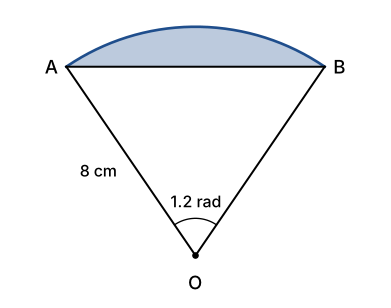
(a) Find the perimeter of the shaded segment. [3 marks]
(b) Find the area of the shaded segment. [3 marks]
Give your answers correct to 3 significant figures.
The common wrong answer
This is the working I see most often for part (b). The method is right:
Then the calculator, still in degree mode from the last trigonometry question, gives , so
The formula is correct, but has been worked out as the sine of , a tiny angle, instead of radians (about ). The triangle comes out as only , so the “segment” is almost the whole sector. Look at the diagram: triangle clearly takes up most of the sector, so that can’t be right.
The same slip spoils part (a): in degree mode gives a chord of , when the diagram shows is a little longer than the radii.
The correct working
Set your calculator to radian mode first. The angle is rad and .
(a) Arc length, using :
For the chord, split triangle down the middle into two right-angled triangles, each with angle rad at :
(The cosine rule gives the same: , so .)
Perimeter of segment:
So the perimeter is .
(b) Area of sector, using :
Area of triangle , using :
Area of segment:
So the area is .
Why it works
The formulas and only work when is in radians, and in this question the angle is given in radians. That means every trigonometric function of that angle must be worked out in radians as well. Your calculator doesn’t know which unit the question uses: in degree mode is the sine of , a completely different angle from rad.
You could convert instead ( rad ) and use degree mode for the sine, but that’s an extra step and an extra chance to round too early. Staying in radians throughout is simpler.
Examiners mention this one regularly: candidates who set out a correct method lose the accuracy marks because their calculator was in degree mode, or because they mixed degrees and radians in the same working.
How to spot it next time
- When you see “radians” or an angle with no degree sign (like or ), check that your calculator shows R or RAD before you press anything.
- Quick test: should be about . If you get , you’re in degree mode.
- Sense-check against the diagram. A segment cut off by an angle of about is only a small part of the sector (here about ), and a chord across that angle is about as long as the radius, not a fraction of a centimetre.